

 Yesim Team
Three airports handle nearly every international arrival in Japan: Haneda, Narita, and Kansai. Each one sells SIM cards and eSIMs somewhere in the terminal, but counter hours are limited and a queue after a long flight burns time nobody wants to spend standing in line. An eSIM bought before you fly and activated the moment you land skips that wait entirely.
This guide walks through what each airport sells, where to find it, and what it costs, so you can decide before you even travel to Japan if you’d rather wait for a counter or arrive already connected. Japan travel connectivity doesn’t need to be complicated once you know which option fits your trip.
eSIM vs physical SIM vs pocket WiFi at Japan’s airports
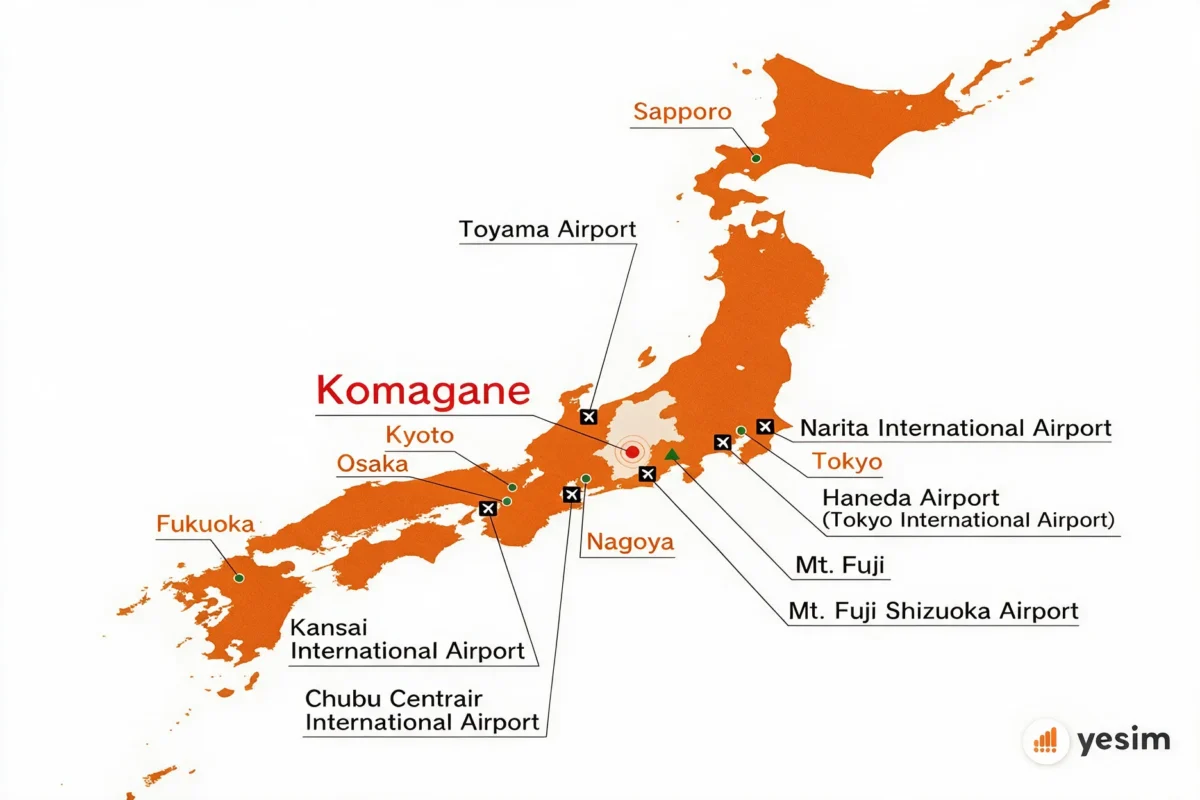
Three real options exist once you land, and they work differently enough to matter for anyone traveling to Japan for the first time. A Japan airport eSIM purchase, a physical SIM, and a pocket WiFi rental all solve the same problem in different ways.
- A travel eSIM is a digital SIM profile, a form of eSIM technology that skips plastic sim cards entirely. You install it by scanning a QR code, no counter visit required, and it can be done from home before you even board your flight.
- A normal SIM, the physical kind, is a real card handed to you at a terminal counter, usually after showing your passport, then inserted into your phone, traditional SIM cards still work fine in Japan but the process takes longer than most people expect after a long flight.
- Pocket WiFi rental gives you a small router for the trip, returned before you fly home, useful when a group wants to share one connection across several devices rather than juggling sim cards and eSIM profiles for everyone separately.
For a full breakdown of specific eSIM providers and plans for Japan, the best eSIM for Japan guide compares them side by side.
Whichever option you pick, sort it out before your flight if you can. Airport counters close, batteries die, and you sometimes need wifi to activate a profile in the first place, none of that matters if your eSIM is already installed and waiting to activate.
Haneda Airport (HND): eSIM and SIM card guide
Haneda sits closest to central Tokyo, with three terminals, T1, T2, and T3 handling international arrivals.
Where to buy a SIM card at Haneda Airport
Nine points of sale are spread across the three terminals, a mix of staffed counters and 24-hour self-service options:
- Haneda Airport Mobile Center: T2/T3, staffed counter.
- Air BIC Camera: T3, staffed counter.
- Air Lawson: T1/T3, staffed counter.
- Seven-Eleven: T1/T3, open 24 hours.
- J WiFi & Mobile / GLOBAL WiFi / NINJA WiFi: T2/T3, staffed counter.
- SoftBank / AnyFone JAPAN: T3, staffed counter.
- XCom Global: T3, staffed counter.
- FamilyMart: T2, open 24 hours.
- J Walker vending machine: T3, self-service, open 24 hours.
Hours and prices may vary, always check the official counter or vending machine on arrival.
How do you get and activate an eSIM at Haneda Airport?
Getting online takes four quick steps once you’re through arrivals:
- Connect to the airport’s free Wi-Fi (SSID: HANEDA-FREE-WIFI).
- Install your eSIM profile through the QR code or your provider’s app, if you haven’t already done this before flying.
- Switch your data line to the eSIM in your phone’s settings.
- Confirm the connection works, opening Google Maps is a quick test.
The eSIM itself can be bought and installed well before your flight. Activation is the only step that happens once you land.
Haneda Airport eSIM and SIM prices at a glance
Physical SIM prices at Haneda run roughly ¥2,000 for short, light data plans up to ¥8,000 or more for unlimited or longer-duration plans. An eSIM bought online ahead of time typically covers a comparable amount of data for less.
Narita Airport (NRT): eSIM and SIM card guide
Narita is Tokyo’s main international hub, further from the city center than Haneda, spread across three terminals.
Where to buy a SIM card at Narita Airport
Narita spreads its points of sale across all three terminals, with several 24-hour options for late arrivals. Anyone searching for eSIM Narita Airport options specifically, including a narita airport eSIM kiosk, a narita airport eSIM vending machine, or a narita airport eSIM counter, finds all three here in different forms:
- JAL ABC: T1/T2, staffed counter.
- XCom Global: T1/T2, staffed counter.
- J WiFi & Mobile: T1/T2/T3, staffed counter.
- TelecomSquare: T1/T2, staffed counter.
- AnyFone Japan: T1/T2, staffed counter.
- SoftBank Global Rental: T1/T2, staffed counter.
- Rakuten Mobile: T1, staffed counter.
- 7-Eleven and Lawson: all terminals, open 24 hours.
- GPA vending machines: 10 machines across all three terminals, open 24 hours.
Hours and prices may vary, always check the official counter or vending machine on arrival.
How do you get and activate an eSIM at Narita Airport?
The process matches Haneda’s, connect, install, switch, confirm:
- Connect to the airport’s free Wi-Fi (SSID: FreeWiFi-NARITA).
- Install your eSIM profile through the QR code or your provider’s app, ideally done before you fly.
- Switch your data line to the eSIM in your phone’s settings.
- Test the connection with a quick map search or message.
One useful check before you even leave home: dial *#06# on your phone. If an EID number shows up on screen, your device supports eSIM.
Narita Airport eSIM and SIM prices at a glance
Physical SIM prices at Narita range from about ¥2,000 to ¥3,300 for short, light plans, up to ¥9,900 or more for unlimited options. An online eSIM covering similar data usually costs less for the same allowance.
Kansai Airport (KIX): eSIM and SIM card guide
Kansai is the main gateway to Osaka and the wider Kansai region, split across two terminals.
Where to buy a SIM card at Kansai Airport
Kansai’s options sit across its two terminals, with vending machines covering the overnight gap:
- SoftBank Rental Counter: T1, staffed counter.
- Sakura Mobile Counter: T1, staffed counter.
- Telecom Square: T1, staffed counter.
- NINJA WiFi: T1/T2, staffed counter.
- Xcom Global: T1/T2, staffed counter.
- Parrot Beak Global SIM vending machines: multiple locations across T1 and T2, open 24 hours.
Hours and prices may vary, always check the official counter or vending machine on arrival.
How do you get and activate an eSIM at Kansai Airport?
Same four steps as the other two airports:
- Connect to the airport’s free Wi-Fi.
- Install your eSIM profile through the QR code or your provider’s app before you land, if possible.
- Switch your data line to the eSIM in your settings.
- Confirm you’re online before heading to ground transport.
Kansai Airport eSIM and SIM prices at a glance
Typical pricing at Kansai runs around ¥3,000 to ¥5,000 for a few gigabytes over 7 to 14 days. Airport pricing usually sits 20 to 30% above what the same plan costs booked online in advance.

eSIM vs airport SIM card vs pocket WiFi: comparison table
Across all three airports, the same pattern holds regardless of which terminal you land in.
| eSIM | Airport SIM card | Pocket WiFi | |
|---|---|---|---|
| Where to get it | Online, before you fly | Terminal counter or vending machine | Terminal counter or pre-booked pickup |
| Need to visit a counter | No | Usually yes, or a vending machine | Usually yes |
| Available 24/7 | Yes, activates on Wi-Fi anytime | Only at vending machines and convenience stores | Depends on the counter’s hours |
| Typical price for ~10GB | Often lower than airport pricing | ¥2,000–¥10,000 depending on plan and airport | Comparable to airport SIM, priced per day |
| Best for | Solo travelers, no counter wait | Those who prefer buying on arrival | Groups sharing one connection |
Quick comparison: best eSIMs for Japan
Japan has more named eSIM providers than most destinations, so the table below lays out where each one stands:
| Provider | Network | Unlimited | Hotspot | Starting price | Best for |
|---|---|---|---|---|---|
| Yesim | Docomo + SoftBank | Yes | No cap | €3.70/day unlimited | Best overall, lowest per-GB rate |
| Ubigi | NTT Docomo | Yes | Yes | ~$4/day | Japan specialist, rural coverage |
| Airalo | SoftBank | No | Yes | $4.50 / 1GB | Budget, short trips |
| Holafly | SoftBank + au | Yes | 500MB/day | $27.30 / 7 days | Unlimited, tourists |
| Saily | NTT Docomo | Yes | Yes | $3.59 / 1GB | Cheapest Docomo access |
| Nomad | SoftBank + KDDI | No | Yes | $6 / 1GB | Digital nomads, Asia trips |
| Sakura Mobile | Docomo + au | Yes | Yes | ¥2,000 / 1GB | Japan-native, no app needed |
| GigSky | Auto-select | Yes (capped) | Yes | $4.99 / 1GB | Free trial, short unlimited windows |
For deeper detail on any of these, the best eSIM for Japan guide breaks down full plan options. Check current Yesim Japan plans directly, and use the data calculator to size a plan to your trip length before you fly.
Yesim tip: if you’re arriving late at night or on an early morning flight, check that your specific airport’s staffed counters will even be open when you land. The 24-hour vending machines and convenience stores cover the gap, but an eSIM installed in advance skips the question entirely.
Is your phone eSIM compatible?
Before you purchase an eSIM for your trip to Japan, confirm your device supports it. Most phones released in the last several years are eSIM compatible, but older models and some carrier-locked devices aren’t, and finding this out once you arrive in Japan is the wrong moment. Anyone traveling in Japan for the first time should run this check before booking an unlimited Japan eSIM or any fixed-data mobile data plan.
The quickest eSIM compatibility check takes seconds: dial *#06# on your phone. If an EID number appears on screen, your device supports eSIM, and scanning the eSIM QR code your provider sends takes just a minute more. No EID, no eSIM, in that case a physical SIM or pocket WiFi rental is your route instead.
Networks in Japan run on the NTT Docomo / KDDI / SoftBank network group, and kddi and ntt docomo between them cover the vast majority of the country, with 4G and 5G both widely available, avoiding roaming charges from your home carrier entirely once you’re connected locally. Most data-only eSIM plans automatically connect to whichever of these networks the provider partners with, so you don’t need to pick a network yourself, just a plan sized to your trip, a light prepay option or a larger data-only eSIM for a longer stay.
Why activating your eSIM before you land is the smarter choice
A few practical points make this worth doing ahead of time rather than at the airport:
- No queue after a long flight, you skip the counter entirely and stay connected in Japan from the moment you land.
- Works even if you land late at night, once staffed counters are closed, so you’re connected in Japan regardless of your arrival time.
- Usually cheaper than buying the same unlimited data plan or fixed data eSIM at the airport counter.
- Your home number stays active on a second line for calls and texts, since an eSIM runs alongside your physical SIM rather than replacing it, a dual SIM smartphone handles both without any extra hardware.
Heavy data users planning to be online across Japan for train stations, navigation, and messaging the whole trip benefit most from setting this up early, since fair usage limits and daily caps vary a lot between providers and it’s easier to compare data options and a 5G unlimited plan calmly at home than mid-queue at the airport. Once you get an eSIM in Japan set up, you can also activate your eSIM for future trips the same way, since most providers let the profile sit ready until you need it. For a full list of models that support this, see the dual SIM iPhone guide.
If you’re new to the setup process itself, the guide to activating an eSIM on iPhone walks through it step by step. Check Yesim’s Japan eSIM plans before your trip.
Yesim tip: buy your eSIM a few days ahead, not the night before your flight. If it turns out your specific phone doesn’t support eSIM after all, you’ll still have time to plan a backup instead of discovering the problem at check-in.
Conclusion
Haneda, Narita, and Kansai all offer enough ways to get connected on arrival, staffed counters, vending machines, convenience stores, whichever local provider you land on. But the fastest and most predictable route for anyone traveling to Japan is buying and installing an eSIM before you fly, then activating your eSIM the moment you connect to the airport’s free Wi-Fi. Soon as you land, you’re online, no counter, no queue, no waiting for a staffed desk to open.
If you’re after a single eSIM covering your whole trip or comparing global eSIM options like Ubigi eSIM or Saily eSIM against Yesim, the same principle holds: sort it out before you go, not after you arrive. Once you’re connected, the best places to visit in Japan guide is a good next stop for planning the rest of the trip.











 Vika Laki