

 Max Pankratov
The question “what happens if I delete my eSIM” has a short answer, take a breath. In most cases, you have not lost anything permanently. Your cellular data plan likely still exists at the provider’s end, only the profile on your phone was erased.
If you are planning to delete your eSIM and want to understand the consequences first, this article covers both situations. If you delete your eSIM what happens next: your phone loses service on that line, but your plan survives. You will learn what happens to your number, and if you delete an eSIM what happens to your data plan, your data plan, and your subscription when an eSIM is deleted, whether you can get it back, and how to do it on iPhone and Android. There is a step-by-step recovery section below, plus a comparison of how the main eSIM providers handle reinstallation.
What is an eSIM and what does “deleting” it actually mean?
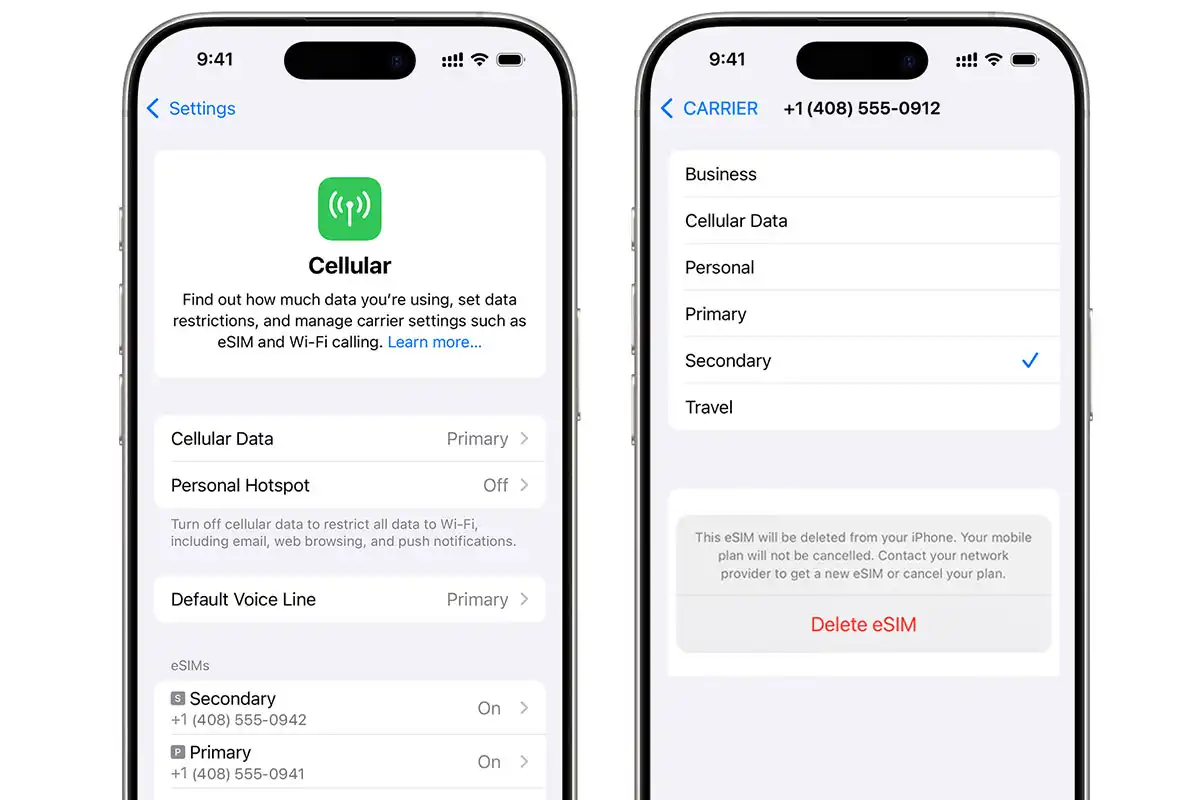
An eSIM is not a physical card. It is a digital profile stored in your phone’s built-in chip, a software layer that tells your device which carrier to connect to. When you “delete” an eSIM, you are erasing that profile from your phone’s memory. You are not cancelling your account with the provider. You are not destroying anything at their end.
This is the point that matters most: Deleting the eSIM profile from your phone and cancelling your data plan are two completely separate actions. One does not automatically do the other.
Your carrier or eSIM provider still has your account on record. What you lost is the installation on your specific device, and in most cases, that can be restored.
Also read: eSIM vs physical SIM, what’s the difference, a complete breakdown of how eSIM technology works and why it behaves differently from a physical card.
What happens when you delete an eSIM: step-by-step breakdown
If you delete eSIM, what happens next: the profile is gone from your phone but the plan lives on. Here is the full breakdown are two different things. When you remove an eSIM profile from your phone, here is what actually changes:
- Your phone loses connection to that carrier immediately. No calls, no SMS, no mobile data through that line.
- Your other SIM lines are not affected. Physical SIMs and other eSIM profiles continue working normally.
- The carrier’s record of your account remains. Your plan, your number (if it was a carrier eSIM), and any remaining data balance still exist on the provider’s side.
- You cannot reconnect with one tap. Reinstalling requires a QR code or a new activation link, it is not saved locally on the phone after deletion.
- Any active sessions end. Downloads, calls, or data transfers using that eSIM stop immediately.
Does deleting an eSIM cancel your data plan or subscription?
No, with one important exception. Deleting the profile from your device does not notify the provider or cancel any payments. If you have an auto-renewing subscription, it will keep charging unless you cancel it separately through the provider’s app or website.
For travel eSIMs with a fixed validity window (like a 7-day or 30-day prepaid plan), the plan continues counting down on the provider’s side regardless of whether the profile is installed on your phone. The data does not pause because you deleted the profile.
If you want to stop a payment, go to the provider’s app or account portal and cancel the plan directly. Deleting the eSIM from your phone does not do this for you.
What happens if you accidentally delete your eSIM?
What happens if you accidentally delete your eSIM is identical to an intentional deletion. The question “what happens if I accidentally delete my eSIM” comes up often enough that it deserves a direct answer: nothing is permanently lost, assuming the provider allows reinstallation. This is more common than most people expect. The “Remove eSIM” button sits close to other settings on both iPhone and Android, and it does not always require a confirmation. A few common accidental scenarios:
- Tapping “Remove eSIM” while trying to access data roaming settings
- Resetting network settings, which can remove eSIM profiles on some devices
- Following incorrect setup instructions from a third-party source
If this happened to you, the immediate steps are:
- Do not try anything else on that phone yet.
- Check your email for the original QR code or activation link from the provider.
- If you cannot find it, open the provider’s app and look for a “reinstall” or “reactivate” option.
- If neither works, contact the provider’s support directly. Most can issue a new QR code or reset your activation.
Can you reinstall or restore a deleted eSIM?
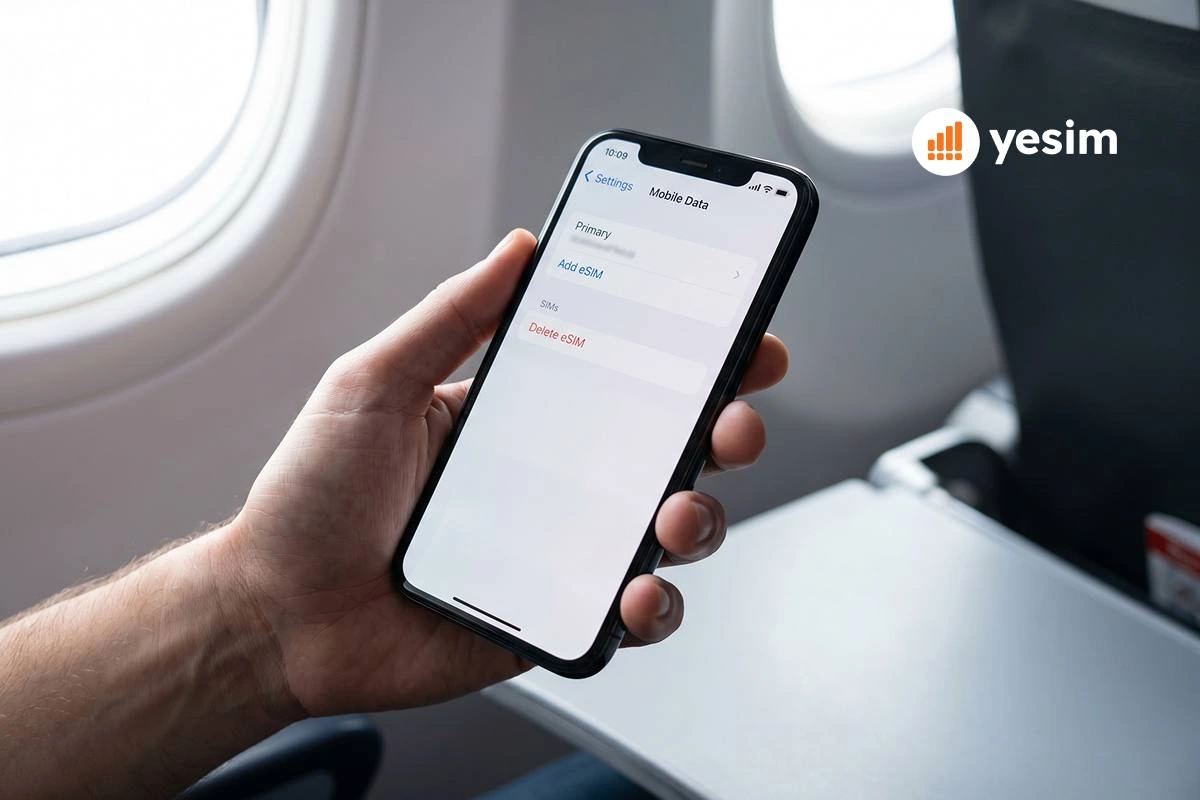
Travel eSIMs from providers like Yesim, Airalo, Holafly, and Saily use QR codes for activation. Many of these QR codes are single-use or limited to a small number of activations. Once used, the QR code may not work a second time.
Carrier eSIMs from major operators (Verizon, AT&T, T-Mobile) generally allow reinstallation through your account portal, though the process requires contacting customer support or going through a self-service flow online.
Yesim allows eSIM profile reinstallation through the app or by contacting support. If you deleted a Yesim eSIM and need it back, the fastest route is opening the app and checking your plan, a new installation option is available if the plan is still active.
How to restore or reinstall a deleted eSIM
What you need before starting: Your original QR code (check the email from your provider) or a new activation link from the provider’s app or support team. Your iPhone must be unlocked.
- To understand how to delete an eSIM from iPhone: Settings → Cellular → tap line → Remove eSIM. How to remove an eSIM from iPhone follows the same path. How to delete an eSIM on iPhone in iOS 17 and later also works this way. To restore after deletion:
- Open Settings on your iPhone.
- Tap Cellular.
- Scroll down and tap Add eSIM.
- Choose Use QR Code.
- Point your camera at the QR code from your provider. If you have the QR code in a screenshot, tap Enter Details Manually or use the QR code image directly if iOS allows it.
- Follow the on-screen prompts to name the new line and set it as the data line.
- Go back to Cellular and confirm the eSIM line is active and data roaming is turned on.
If the QR code does not work (error message saying it has already been used), the provider has restricted reinstallation. In that case, contact their support team directly with your order number, most providers can issue a replacement code.
Also read: How to activate your Yesim eSIM, step-by-step activation guide for all supported iPhone and Android models.
How to restore a deleted eSIM on Android
The exact path differs slightly by manufacturer, but the logic is the same.
Samsung Galaxy (One UI):
- Open Settings → Connections → SIM manager.
- Tap Add eSIM.
- Tap Scan QR code from service provider.
- Scan the QR code or enter details manually.
- Confirm the new line and set it as the active data SIM.
Google Pixel:
- Open Settings → Network & Internet → SIMs.
- Tap Download a SIM instead? or the + button.
- Tap Download and scan the QR code.
- Follow prompts to activate.
Other Android brands (OnePlus, Motorola, Sony): Path varies but generally: Settings → Network & Internet (or Mobile Network) → Add eSIM or Download SIM.
What to do if your provider does not allow reinstallation
Some travel eSIMs, especially budget or entry-level plans, use one-time QR codes that cannot be reused. If you deleted the profile and the QR code is expired or already used:
- Check if the provider has a re-issue policy. Contact support with your order confirmation. Some providers will issue a new code for a small fee or for free if it was an accidental deletion.
- If the plan had data remaining, the provider may credit you. This is not guaranteed but worth asking.
- If no reinstallation is possible, buy a new plan. For travel eSIMs, the cost is usually low enough that this is the practical solution.
Yesim plans can be managed and reinstalled through the app. If you need a new plan for an upcoming trip, browse plans by destination.

Provider-by-provider eSIM recovery rules
| Provider | Free reinstall? | Activation limit | How to recover | Contact support needed? |
|---|---|---|---|---|
| Yesim | Yes (if plan active) | Multiple via app | Open Yesim app → active plan | Only if app fails |
| Airalo | Limited | QR code typically single-use | Contact support with order number | Yes, usually |
| Holafly | No | Single-use QR code | Buy new plan | N/A |
| Saily | Limited | Contact required | Email support with order ID | Yes |
| Verizon | Yes | Via account portal | My Verizon app → device settings | Rarely needed |
| AT&T | Yes | Via account portal | myAT&T app or store | Sometimes |
| T-Mobile | Yes | Via account portal | T-Mobile app → account → devices | Sometimes |
Deleting vs disabling an eSIM on iPhone and Android: which one should you choose?
Before you delete, consider disabling instead. These are different actions with very different consequences.
| Disable / Turn Off | Delete / Remove | |
|---|---|---|
| What happens | Profile stays on device, line goes inactive | Profile is permanently removed from device |
| Mobile service | Paused on that line | Gone until reinstalled |
| Can you undo it? | Yes, one tap in Settings | Only with QR code or provider action |
| Data plan affected? | No | No (plan still runs on provider side) |
| Phone number affected? | No | No (number stays at carrier) |
| When to use it | Temporary pause, saving battery, testing another eSIM | Selling phone, freeing up eSIM slot, done with the plan |
When to delete your eSIM
- You have finished a trip and the data plan has fully expired
- You need to free up an eSIM slot for a new profile (most phones support 5–20 stored eSIMs, but check your model’s limit)
- You are selling, trading in, or giving away your phone
- You are doing a factory reset and want a clean state
When to disable instead of deleting
- You are briefly returning home in the middle of a longer trip and will need the eSIM again
- You want to test a different eSIM profile without losing access to the current one
- You are troubleshooting a connectivity issue and want to isolate the problem
- You want to save battery by reducing active radio connections
Pre-deletion checklist
Before you tap “Remove eSIM,” run through these five steps:
- Save or screenshot your QR code. If you do not have it stored somewhere accessible, find it in your email and save it now.
- Check your remaining data balance. If you have significant data left and the plan allows reinstallation, decide if you actually need to delete.
- Cancel any auto-renewal if you do not want future charges. Do this in the provider’s app or website, deleting the profile does not stop billing.
- Set another line as your default data SIM so you do not lose internet access immediately after deletion.
- If you need to transfer the eSIM to a new iPhone, confirm the new device is eSIM compatible before removing the profile from the old one. Check the Yesim compatible devices list if you are unsure.
Also read: How to transfer eSIM to new iPhone or Android, what to do when switching devices.
What deleting an eSIM does NOT do
Several things people commonly believe happen when they delete an eSIM, none of them are true:
- It does not delete personal data from your phone. Contacts, photos, apps, and messages are not affected.
- It does not unlock your phone from a carrier. Carrier locks and carrier settings are separate systems and are not changed by eSIM deletion.
- It does not automatically cancel your subscription or stop payments. You must cancel the plan separately through the provider.
- It does not affect other eSIM profiles installed on the same device. Each profile is independent.
- It does not remove your phone number from the carrier’s records. Your number exists at the network level, not on your device.
Special case: deleting a travel eSIM after your trip
If you used a travel eSIM for a single trip, Yesim, Airalo, Holafly, or any other provider, you can delete it after you return home without any risk to your main phone number or primary SIM.
A few things worth knowing before you do:
- Keep the eSIM active until you are completely done travelling. If your return flight is delayed or you have a long layover, you may need data unexpectedly. Delete it once you are home.
- Check whether your data plan has expired. If it has, deleting the profile has no practical downside. If data remains, decide whether the provider allows reinstallation before deleting.
- You do not need the QR code to delete, removal always works. You only need it for reinstallation.
- Holafly plans are single-use. If you delete a Holafly eSIM with data remaining, that data is gone. For other providers, the outcome depends on their policy (see table above).
For your next trip, setting up a Yesim eSIM takes under five minutes and the profile can be managed and reinstalled through the app if needed.
Quick answers: delete eSIM iPhone, remove eSIM, and restore
- What happens if I delete eSIM? Service stops on that line. The plan survives at the provider end.
- What happens if I delete eSIM on iPhone? Same result. Settings → Cellular → Remove eSIM removes the profile. The plan does not cancel.
- How to delete eSIM from iPhone? Settings → Cellular → tap the line → Remove eSIM.
- How to remove eSIM from iPhone? Same path as above. “Remove” and “delete” mean the same thing in iOS.
- How to delete eSIM on iPhone? Settings → Cellular → [eSIM line name] → Remove eSIM → confirm.
- If I delete eSIM what happens to my data balance? It stays on the provider’s side until the plan expires.
- What happens if I delete eSIM and erase data? Both are removed from the device. The plan survives at the provider end.
- What happens if I delete the eSIM profile entirely? Same as any deletion. Profile gone from device, plan intact at provider.
Conclusion
Deleting an eSIM is reversible in most situations, as long as you have your QR code or the provider allows reinstallation through their app or support team. The profile disappears from your phone, but your plan and phone number stay at the network level.
Before deleting: save your QR code, check your balance, and cancel any auto-renewing subscription if you do not want future charges.
If you have already deleted by accident and cannot find the original QR code, contact your provider’s support with your order number. Most can issue a new activation link.
For your next trip, Yesim eSIM plans are manageable through the app, including reinstallation if needed. The activation process takes a few minutes.










 Vika Laki


 Yesim Team